> For the complete documentation index, see [llms.txt](https://indicators.agenatrader.com/llms.txt). Markdown versions of documentation pages are available by appending `.md` to page URLs; this page is available as [Markdown](https://indicators.agenatrader.com/premium-indicators/volume-addon/volumezoneoscillator.md).
# VolumeZoneOscillator
**The installation of the Technical Analysis Package is required in order to access this indicator.**
#### Description
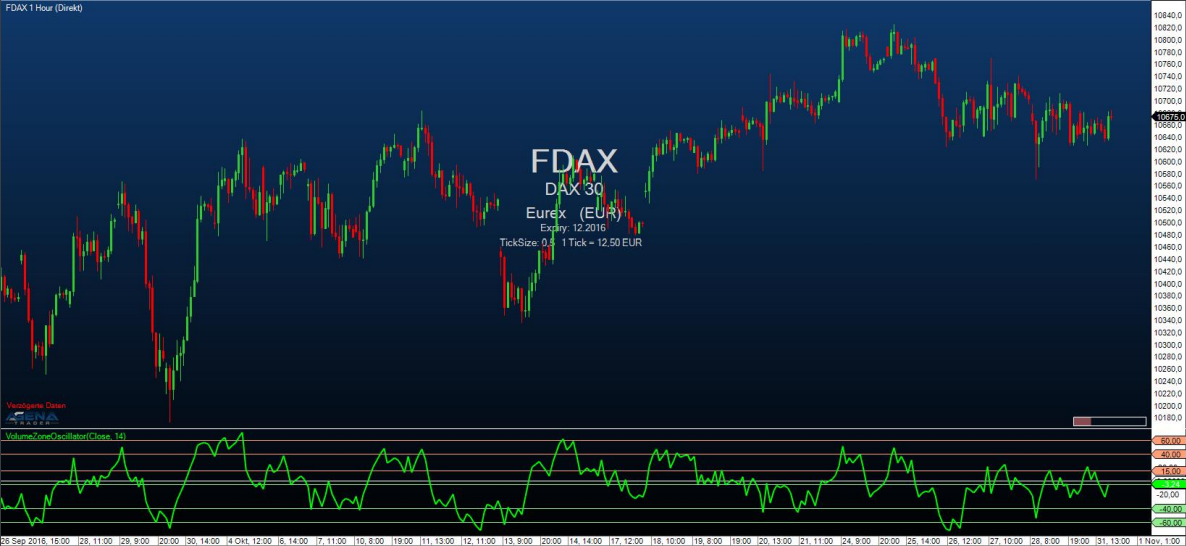
The VolumeZoneOscillator divides the volume activity into UpVolume and DownVolume, similarly to the VolumeUDR. Volume is ranked as UpVolume when the current closing price is located above the prior closing price; vice versa for DownVolume. The oscillator calculated hereby outputs relative percentage values. An instrument is in a positive trend when the VolumeZoneOscillator rises above a level of 5% and vice versa in a negative trend, when it falls below -5%. Values above 40% show overbought situations, while values above 60% are an indication for an extreme exaggeration in the market. On the other hand, values smaller than -40% are deemed oversold and values smaller than -60% to be classified as enormously oversold and exaggerated.
#### Parameters
to be announced
#### Return value
to be announced
#### Usage
to be announced
#### Visualization
#### Example
to be announced