> For the complete documentation index, see [llms.txt](https://indicators.agenatrader.com/llms.txt). Markdown versions of documentation pages are available by appending `.md` to page URLs; this page is available as [Markdown](https://indicators.agenatrader.com/premium-indicators/volume-addon/wyckoffwave.md).
# WyckoffWave
**The installation of the Technical Analysis Package is required in order to access this indicator.**
#### Description
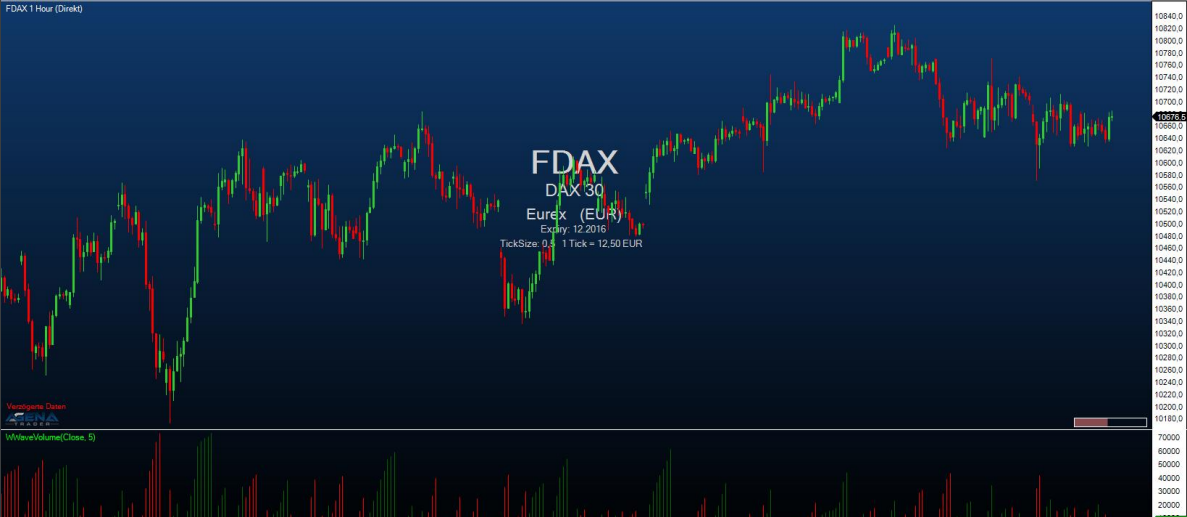
The WyckoffWave indicator adds the volume for each following bar until a price wave is over / finished. You can set the sensitivity of the price waves. When the volume of a wave rises to particularly high values, is it very often because a turning point in the chart has been reached. When the volume bars are colored red, we are dealing with a short wave; green volume bars indicate a long wave.
Using the parameter “MedianPeriod” you can select how sensitively the indicator should determine the individual price waves. The smaller the value, the larger the price waves that the indicator calculates.
The parameter Poles serves to fine-tune the display of the volume waves; you can select a parameter between 1-4. Changing this value usually causes only imperceptible changes.
#### Parameters
to be announced
#### Return value
to be announced
#### Usage
to be announced
#### Visualization
#### Example
to be announced